What is a Solid State Drive?
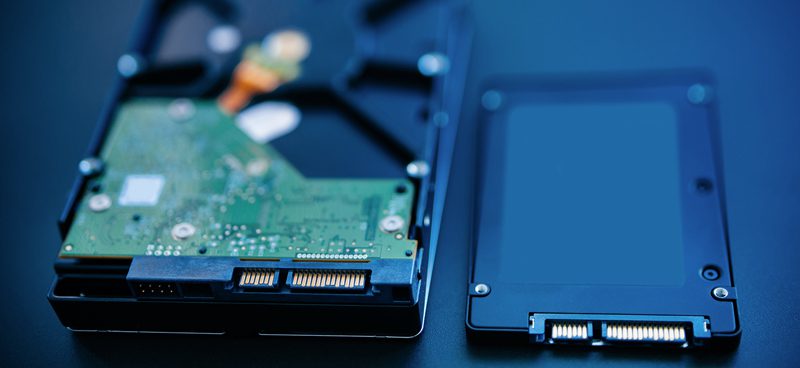
Manufacturers first showcased solid-state drives (SSD) commercially in 2007 at the Consumer Electronics Show (CES) in Las Vegas, Nevada. Like traditional hard drives, these drives are data storage devices. Unlike hard drives, however, SSDs use semiconductor technology instead of electromechanical components. That means the drive has no moving parts, so it runs silently. The lack of moving parts also nearly eliminates the risk of mechanical failure.
The SSD’s design is its real advantage. It uses the same core technology as a USB flash drive and other NAND flash devices, including Compact Flash cards. As mentioned, the drive has no moving parts, so it gives extremely fast access to the data it stores. It also skips the need to spool the drive or move a read/write head. As a result, seek times run orders of magnitude lower, and random access read times improve dramatically.
Hard Drives vs. SSD: Which Drive Is Best For You?
The choice of which storage medium to use is an important one. Ideally, you need to weigh the pros and cons and consider which solution is right for you. A dedicated server environment is significantly different from a desktop environment, so keeping that in mind is necessary.
Advantages
- Faster start-up, since the drive needs no spin-up time.
- Typically, fast random access for reading, as there is no read/write head to move.
- Read latency stays extremely low, since SSD seek times run orders of magnitude lower than the best hard disk drives.
- In applications where hard disk seeks are the limiting factor, this results in faster boot and application launch times.
- Low-capacity flash SSDs use little power and produce little heat during active use. High-end SSDs and DRAM-based SSDs, however, may need significantly more power.
- High mechanical reliability.
- Ability to endure extreme shock, high altitude, vibration, temperature extremes, etc.
- Deterministic read performance: SSD performance stays almost constant across the entire drive, unlike a hard disk drive. That’s because seek time stays nearly constant no matter where the data sits. As a result, file fragmentation has almost no impact on read performance.
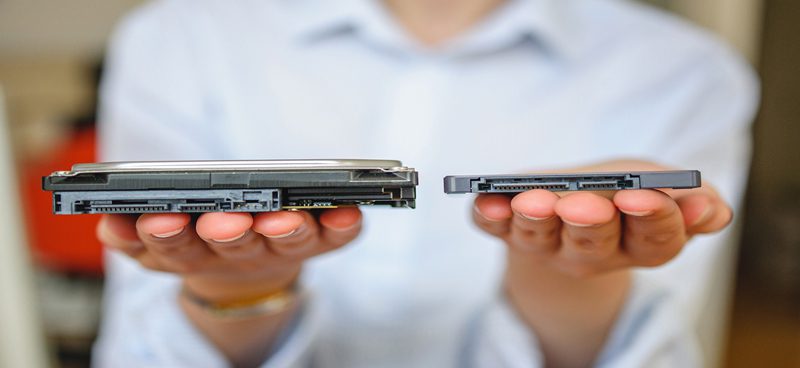
- Low-capacity SSDs also weigh less and take up less space. At scale, though, traditional hard drives still win on weight and size per unit of storage. SSDs and HDDs also fail differently. SSDs tend to fail on a write or an erase, rather than on a read. Traditional HDDs, by contrast, tend to fail on a read instead. If the drive detects a write failure, it writes the data to a new cell instead, with no data loss. If a drive fails while reading, it usually loses the data permanently.
Disadvantages
- As of Q1-2009, SSD prices are still considerably higher per gigabyte than traditional HDDs. Consumer-grade flash drives run about USD 1.75 to 3.25 per GB. RAM-based drives cost even more, at over USD 75 per GB. Traditional hard drives, by comparison, cost less than USD 0.13 per gigabyte.
- Currently, the maximum capacity is far lower than that of conventional hard drives, though.
- DRAM-based SSDs have a higher vulnerability to abrupt power loss.
- Limited write, or erase, cycles: flash-memory cells often wear out after 1,000 to 10,000 write cycles for MLC. SLC cells last longer, up to 100,000 write cycles.
- Slower write speeds: erase blocks on flash-based SSDs run quite large, around 0.5 to 1 megabyte. That makes them far slower than conventional disks for random writes, and sometimes for sequential writes too. This leaves them vulnerable to write fragmentation. SSDs based on DRAM do not share this problem.
- Lower storage density: hard disks can store more data per unit volume than DRAM or flash SSDs. The exception is very low-capacity, small devices.
How Do Hard Drives Perform Under Load?
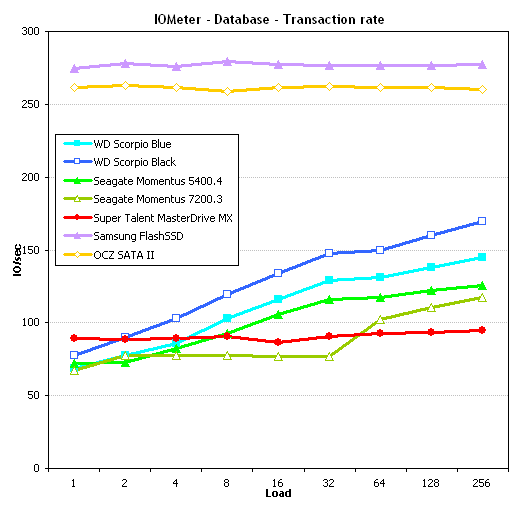
Generally, SSDs of similar quality tend to out-perform their HDD counterparts in dedicated server operations, as the graphs below show. The difference is staggering, and it’s not uncommon to see performance gains of more than double. Super Talent MasterDrive MX, Samsung FlashSSD, and OCZ SATA II are the SSD drives in this scenario.


Source: http://techreport.com
As you can see, the OCZ and Samsung SSDs easily outperform even the best hard drives. The MasterDrive holds its own against the bigger names too, in most benchmarks. In the webserver setup, a read-only arrangement, it even triples its own performance.
When it comes to read operations, SSD is the clear winner. It’s important to take into account the behavior of your environment before deciding on your storage device. Will your server primarily be a read-intensive web server or a heavy-write database-driven application? These are questions you should ask yourself.
Conclusions
As the above list spotlights, SSD storage is a superior option. That said, SSD storage is also less readily available and more expensive. Whether the increased price tag is worth it for your business depends on your budget and needs. Is your business suffering from slow load times, repeated fragmentation, or an overall lag in service performance? If you have the means to switch, SSD is likely your best bet. The cost of SSD server storage runs higher, yes. But the performance benefit of faster read times can be a boon if you want a more responsive dedicated machine. Coupled with the increased mechanical reliability and faster server reboot times, this may just be the solution you need.