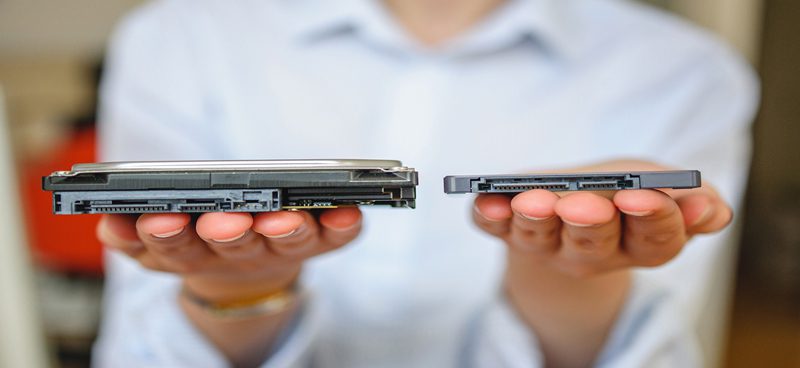
Unless your desktop, laptop, or tablet is one of the newest models, you are probably running on a traditional HDD storage system. This spinning hard drive is the basic permanent storage system for PCs. It is a spinning metal disk with a magnetic coating, and that coating holds your data even after you shut your computer down. Until recently, HDD was the only storage option for PC users. Now, however, manufacturers offer a newer option. This article explains what SSD storage is and how it works. It also reviews whether migrating your company’s storage to an SSD is best for your business.
Understanding SSD Storage
SSD storage performs the same functions as the traditional HDD option. It boots your system and stores all the data and applications you need. The difference lies in how each one stores data and in a few traits unique to each. Instead of a spinning metal platter with a magnetic coating, SSD storage uses a series of small flash memory chips. These chips are all interconnected, so they keep your data even when the power is off. SSD installation is flexible, and users can choose from three options. You can install the flash memory chips permanently in your computer or device. You can also use a PCI/PCIe card or a specialized box wired to the laptop. SSD storage is noticeably faster, and therefore more expensive.
Advantages and Disadvantages of SSD Storage vs. HDD Storage
When deciding whether to switch from traditional HDD storage to SSD, it helps to understand the pros and cons of each. Below, we review the top advantages and disadvantages of SSD storage.
Advantages of SSD
- Speed: Speed is the shining glory of SSD. When it comes to speed, SSD outperforms HDD every time. With SSD technology, your PC boots in mere seconds. A traditional hard drive, by contrast, needs time to spin up to operating speed, so it boots more slowly. SSD-equipped computers also launch applications faster and give users a faster overall experience.
- Limited Fragmentation: Fragmentation occurs when an HDD starts to fill up. As the metal disk fills, the system has a harder time reading documents. Bits of fragmentation can build up and disrupt services. Newer technologies help reduce these risks, but fragmentation is still a common HDD complaint. SSD storage runs on interconnected flash memory chips, so it does not need to keep information in a continuous loop to avoid fragmentation. Therefore, SSD outperforms HDD storage when it comes to fragmentation risks.
- Durability: SSDs have no moving parts, so they are far more durable than a traditional hard drive. Durability is not an immediate problem for most businesses. However, if you are especially hard on your devices, SSD is the more durable option.
Disadvantages of SSD Storage
- Cost: Because the technology is newer, SSD storage costs significantly more per GB than HDD options. On average, you will pay double for an SSD. HDD storage is the traditional method, and the industry understands it well. As a result, the price gap between the two is not likely to change in the next few years.
- Availability: There are simply more hard drive options. Traditional HDD storage has been around for years and is easy to find, install, and manage. Switching to an SSD system means using a less readily available technology, and that may cause headaches down the road.
Reviewing these advantages and disadvantages should give you a better idea of whether SSD migration is best for your business. Overall, SSD storage is faster, more durable, and less prone to fragmentation.
Determining Which Works Best For Your Business
As the list above shows, SSD storage is the superior option. That being said, it is also harder to find and more expensive. Whether the higher price is worth it depends on your budget and needs. Maybe you can afford to switch, and your business suffers from slow load times, repeated fragmentation, and an overall lag in performance. In that case, SSD is likely the best bet for you. On the other hand, if finances are tight and your current system serves your business well, HDD will likely suffice for a few more years.
Ready to See How Volico Data Center Can Help You?
Got questions? Want to talk specifics? That’s what we’re here for.
Have one of our friendly experts contact you to begin the conversation. Discover how Volico can help you with your Hosting needs.
• Call: (305) 735-8098
• Chat with a member of our team to discuss which solution best fits your needs.